Managed PowerSchool SIS services for district operations.
Extend your district’s PowerSchool SIS team with support, day-to-day administration, reports and extracts, plugins, data-quality monitoring, state reporting readiness, approved automation, and vetted professionals—delivered directly or through a configured regional partner.
What districts use PSUG.pro for
Services available in the district workspace
- PowerSchool SIS support
- Day-to-day SIS administration
- Reports and extracts
- Plugins and admin tools
- Data cleanup and data-quality monitoring
- State reporting readiness and validation
- SIS Assistant and Report Builder agents
- Server-health monitoring where enabled
- Workflow automation
- Vetted expert services
- Regional-partner delivery where configured
One portal for every PowerSchool request.
Staff describe what they need once. On Pro and Advisor, the SIS Assistant and Report Builder agents pick up the work. Agent work uses PSUG Credits. Projects we expect to take more than an hour are often scoped and priced before they start.
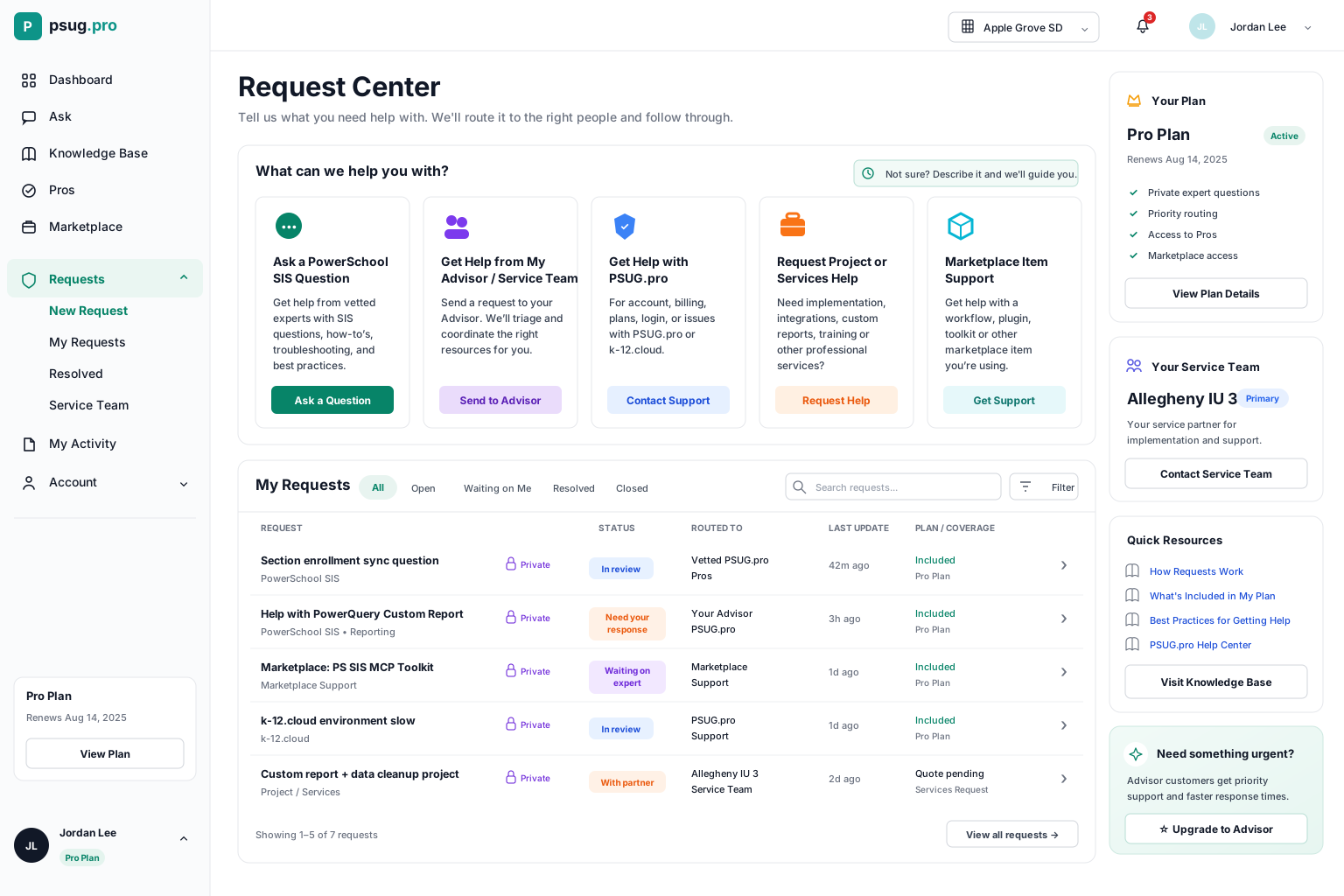
Hover a highlight to see how PSUG.pro routes each request to Pros, partners, or support.
Pro includes 2,500 monthly PSUG Credits.
Those credits cover agents, workflows, and a support ticket with the SIS Assistant. AI questions are unlimited for ordinary district use. Projects we expect to take more than an hour are often scoped and priced separately.
How PSUG Credits work.
Agents, workflows, and SIS support tickets use PSUG Credits. AI questions on Pro and Advisor are unlimited for ordinary district use.
Agents, workflows, and SIS support
That work uses PSUG Credits. AI questions on Pro and Advisor are unlimited.
Usage varies by model
Credits depend on the model and the amount and type of information processed.
Included credits expire
Unused included credits expire three months after each monthly grant.
People stay in control
A support ticket with the assigned agent uses PSUG Credits. Projects we expect to take more than an hour are often scoped and priced in USD. Sensitive SIS actions require authorization.
Unused included credits expire three months after they are granted. Purchased credits are used after included credits and remain available while your subscription stays active.
Your SIS Assistant, ready in chat.
Chat with the SIS Assistant from the Agents workspace whenever your team needs PowerSchool help, and hand the conversation to people when it needs a person.
Authorized staff open a ticket and talk with the SIS Assistant. That work uses PSUG Credits. When the district enables it, the agent can work in the SIS. Projects we expect to take more than an hour are often scoped and priced before they start.
Agent chat
Chat with the SIS Assistant or Report Builder
Your service team
Send a chat to your assigned service team
Requests
Turn any Ask conversation into a tracked request
Included agents, and what is planned
Pro and Advisor both include the SIS Assistant and the Report Builder. The other agents shown here are planned and not included in any plan yet. Agent work uses monthly credits.
SIS Assistant
Day-to-day SIS support
Helps organize requests, answer common SIS questions, track tickets, prepare scoped work, and route issues to the right expert.
- Answers PowerSchool SIS questions
- Organizes incoming support requests
- Tracks ticket status
- Routes work to Pros or authorized staff
Agents can monitor, summarize, prepare tickets, and alert staff. Authorized humans stay in control of sensitive actions.
Pro also includes the tools to keep work moving.
How paid district support works
Paid plans include a support ticket with an assigned SIS agent. On Pro and Advisor, that agent is the SIS Assistant, and the Report Builder handles PowerSchool object reports. Agent work uses PSUG Credits. When the district enables SIS access for support, the agent can work in that environment. Work we expect to take more than an hour is often scoped and priced before it starts. If the issue belongs with PowerSchool Support, we help manage that escalation. PSUG.pro platform issues stay included until resolved.
Uses credits
SIS support
Authorized district staff open a ticket and talk with an assigned agent. On Pro and Advisor, that agent is the SIS Assistant, and the Report Builder handles PowerSchool object reports. That agent work uses PSUG Credits. When the district enables SIS access for support, the agent can work in the district SIS.
- A ticket conversation with the assigned agent
- Pro and Advisor include the SIS Assistant and the Report Builder
- Agent work uses PSUG Credits
- SIS access for that agent when the district enables it through support
- Help managing a PowerSchool Support case when that is the right path
Uses credits
PowerSchool Support escalation
When an issue belongs with the district’s PowerSchool support entitlement, the assigned agent helps manage that case. That assistance uses PSUG Credits. It does not replace the district’s PowerSchool agreement.
- Prepare the PowerSchool support case when the district authorizes it
- Document reproduction steps and diagnostics
- Track the case and keep authorized staff informed
- Help the district submit the case when PSUG.pro cannot submit it directly
Scoped when longer
Longer projects
Common SIS services are available and use PSUG Credits. When we expect a project to take more than an hour, we often send a scope and price and start that project only after the district approves it.
- Custom reports, extracts, plugins, and admin tools
- Configuration projects and data remediation
- Migrations and new integrations or workflows
- Other projects we expect to take more than an hour
What this does and does not include
- SIS agent work, including a support ticket, uses PSUG Credits.
- On Pro and Advisor, the included agents are the SIS Assistant and the Report Builder.
- When the district enables it, the assigned agent can work in the district SIS.
- Work we expect to take more than an hour is often scoped and priced before it starts.
- PSUG.pro platform issues — account, billing, login, and defects in PSUG.pro — stay included until resolved and do not use this project rule.
- PSUG.pro is not PowerSchool's authorized support provider. PowerSchool controls its own response times, decisions, fixes, and service levels.
Advisor also includes Designated SIS Advisor, Monthly SIS operations review, Ongoing guidance.
Start free. Upgrade when your district needs automation and work delivered.
- 100 AI questions per month
- Search the knowledge base
- Use the community forum
- Browse the Marketplace
- Find vetted Pros
- Unlimited AI questions
- 2,500 monthly PSUG Credits
- Workflows — build, schedule, run, and review automations
- 1 included k-12.cloud automation environmentk-12.cloud
- SIS Assistant and Report Builder agents
- SIS support with your assigned agent
- Pro Marketplace access
- Ticket and work-request management
- Priority access to vetted Pros
- Everything in Pro, including one automation environment
- 7,500 monthly PSUG Credits
- Same included agents as Pro: SIS Assistant and Report Builder
- Designated SIS Advisor
- Administrator-controlled SIS permissions
- Guided configuration
- Monthly SIS operations review
- Quarterly review
Support many districts? PSUG.pro also offers a regional partner model for IUs, consortia, BOCES, and support centers.
Explore partner benefitsAsk for free. Upgrade when there’s real work to do.
PSUG.pro gives districts a simple path from SIS questions to a managed SIS operations team — automation, agents, and designated advisors — without starting from scratch every time.